Most lifting apps are designed around logging. Pick an exercise, enter a weight, enter some reps, and move on. Add a few charts, streaks, notifications, and colored rings around that loop and you can call things good.
Korivo has to do more than log what already happened. It has to help someone build a program that unfolds across weeks or months, connect that program to a changing nutrition plan, describe progression, handle differences in nutrition and training from one day to another, and still be simple enough to use between sets at the gym.
The phone is where you do your day-to-day work. The desktop is where you design a program around your long-term goals.
Using the same interaction model on both platforms is the obvious route. It’s the route most apps take. But authoring and logging are fundamentally different activities.
01 / Two jobs
The phone is for training. Studio is for building.
Korivo’s iPhone app has to work when your hands are sweaty and the next set is the only thing on your mind. During a workout, speed and predictability beat richness. The app needs to show you what’s next, remind you where you are in the workout, and otherwise stay out of the way.
Program design is different. You need to see relationships across time. You need room to compare different workouts, diet plans, and how you want to progress over time. You also want insight into how changing one aspect of your plan helps or hurts the rest of it.
That’s why we include Korivo Studio with your purchase. Trying to jam both of these very different activities into one app and one surface means both lose.
- The phone favors execution, immediacy, and a narrow decision surface.
- Studio favors construction, comparison, and seeing the whole system.
Both use the same files, terminology, and underlying program structure.
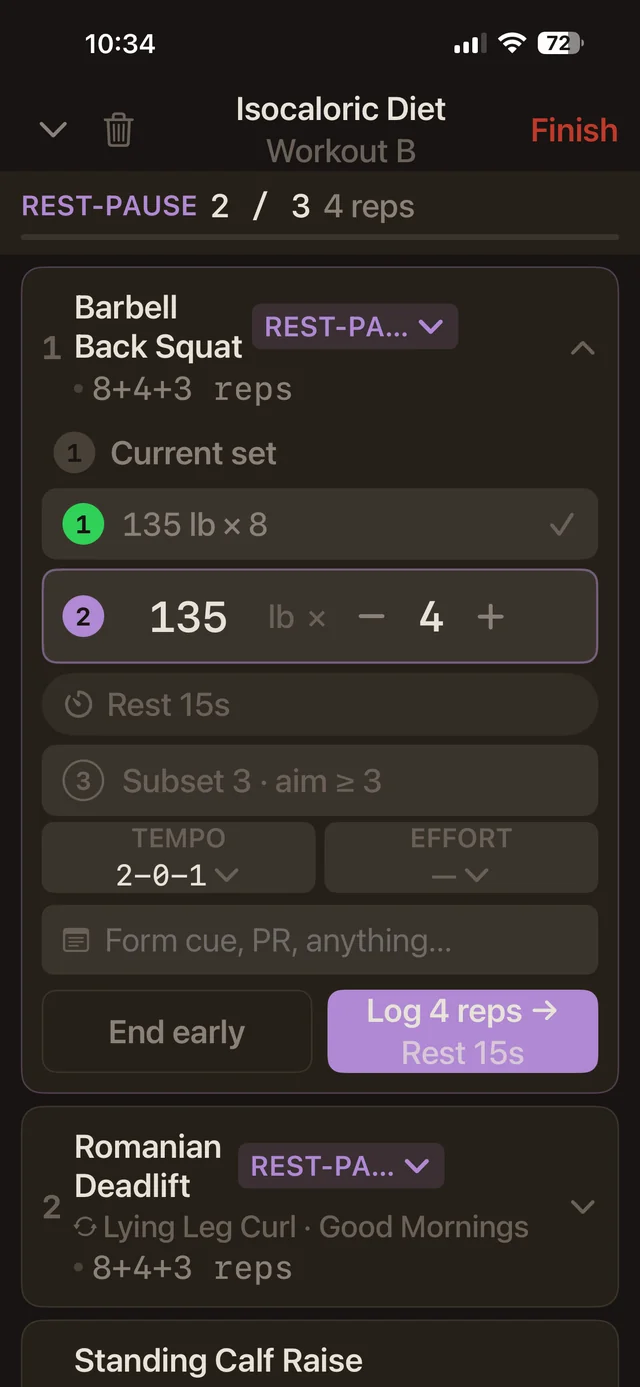
One program, two modes of work
02 / Progression
Progression is a shape
Training and nutrition software usually exposes its structure directly. Programs become lists, progressions are tables of percentages, and diets are often complex formulas. That approach is functional, but it makes the user reconstruct the real model in their head.
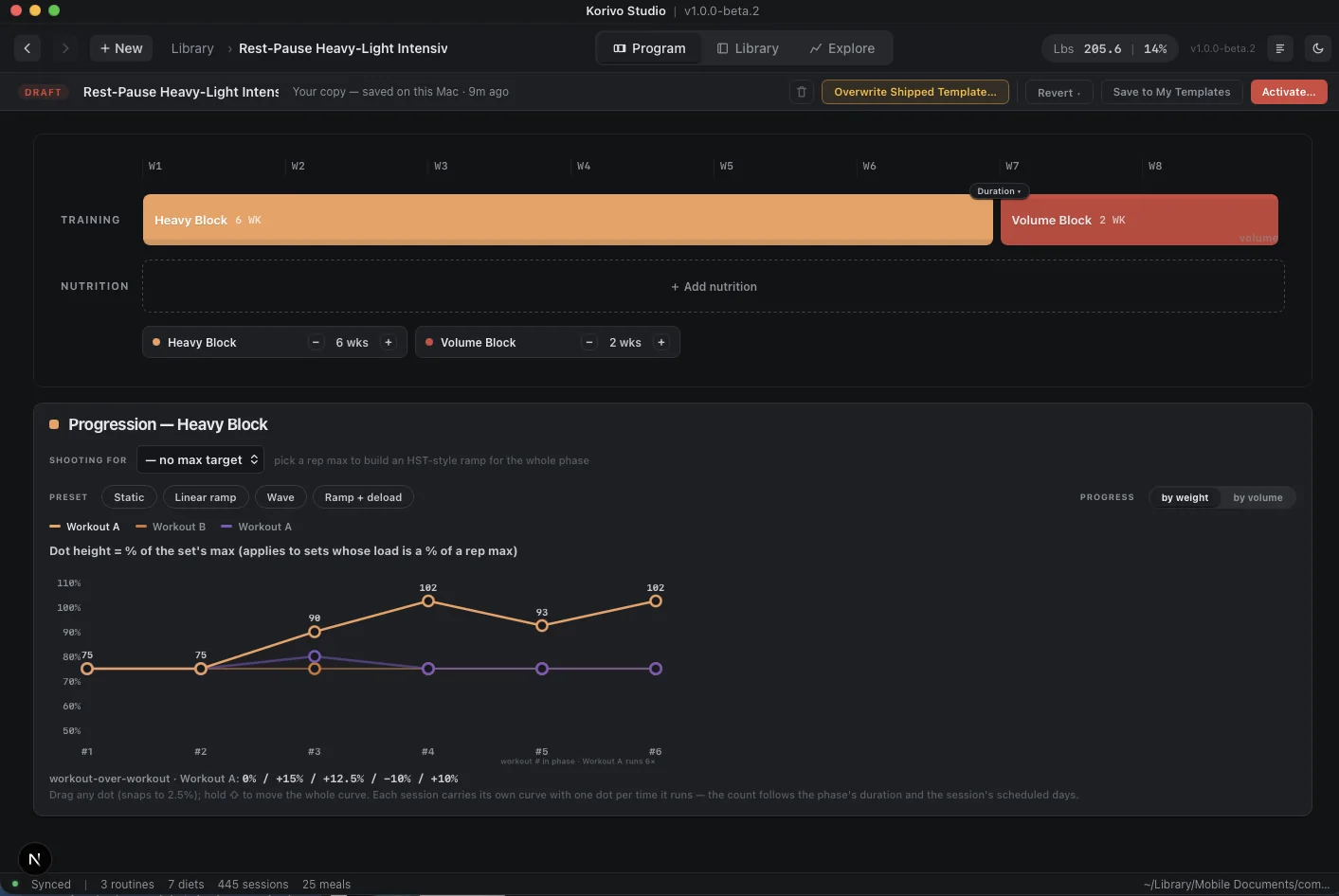
A six-week progression isn’t naturally a table. It’s a shape over time. You should be able to drag a point because the curve is what you’re thinking about. Drag one point to change one workout. Move the entire curve to shift the progression while preserving its shape.
The curve comes from the program itself. If a session runs six times during a phase, it has six points. Change the phase duration or schedule and the shape responds. Studio visualizes relationships that already exist in the program instead of making you reconstruct them from a pile of fields.
Progression editor
03 / Time
How your diet and training connect is fundamental
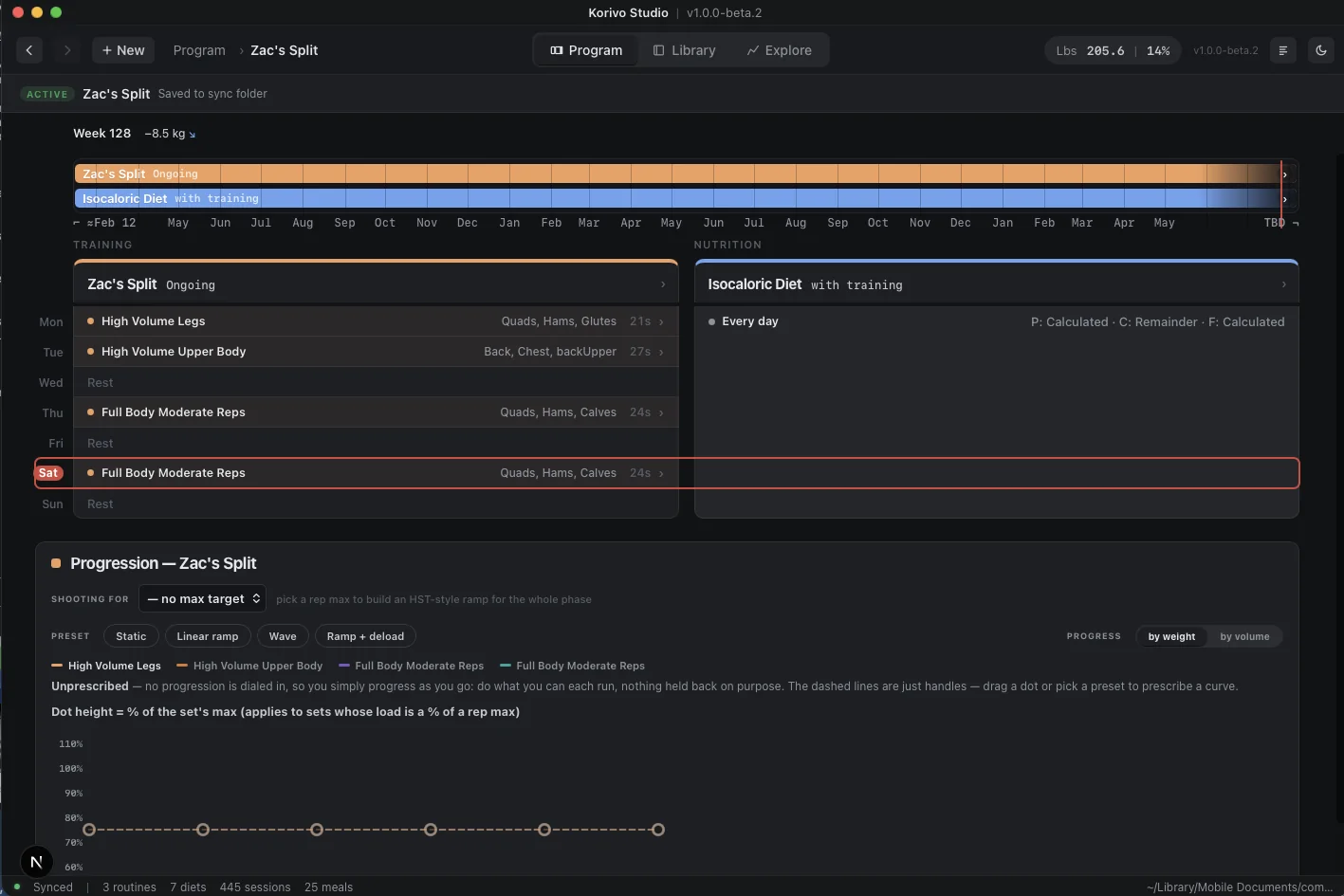
Training phases and nutrition phases overlap, and a change in one often exists because of a change in the other. Studio lets you see the interaction between the two. Training occupies one lane. Nutrition occupies another. Their durations and boundaries are visible together, with the current week and scheduled work underneath.
That view answers basic questions without opening anything:
- Where are the hard training weeks?
- Does the diet phase line up with them?
- When does the deload happen?
- How long is the transition?
- What changes next?
The timeline isn’t decoration. It’s the schedule shown in a form that makes sequence, duration, and overlap easier to understand.
Program map
04 / Nutrition
Nutrition rules need a visible model
Nutrition planning gets awkward quickly when it moves beyond one calorie target and a fixed macro split.
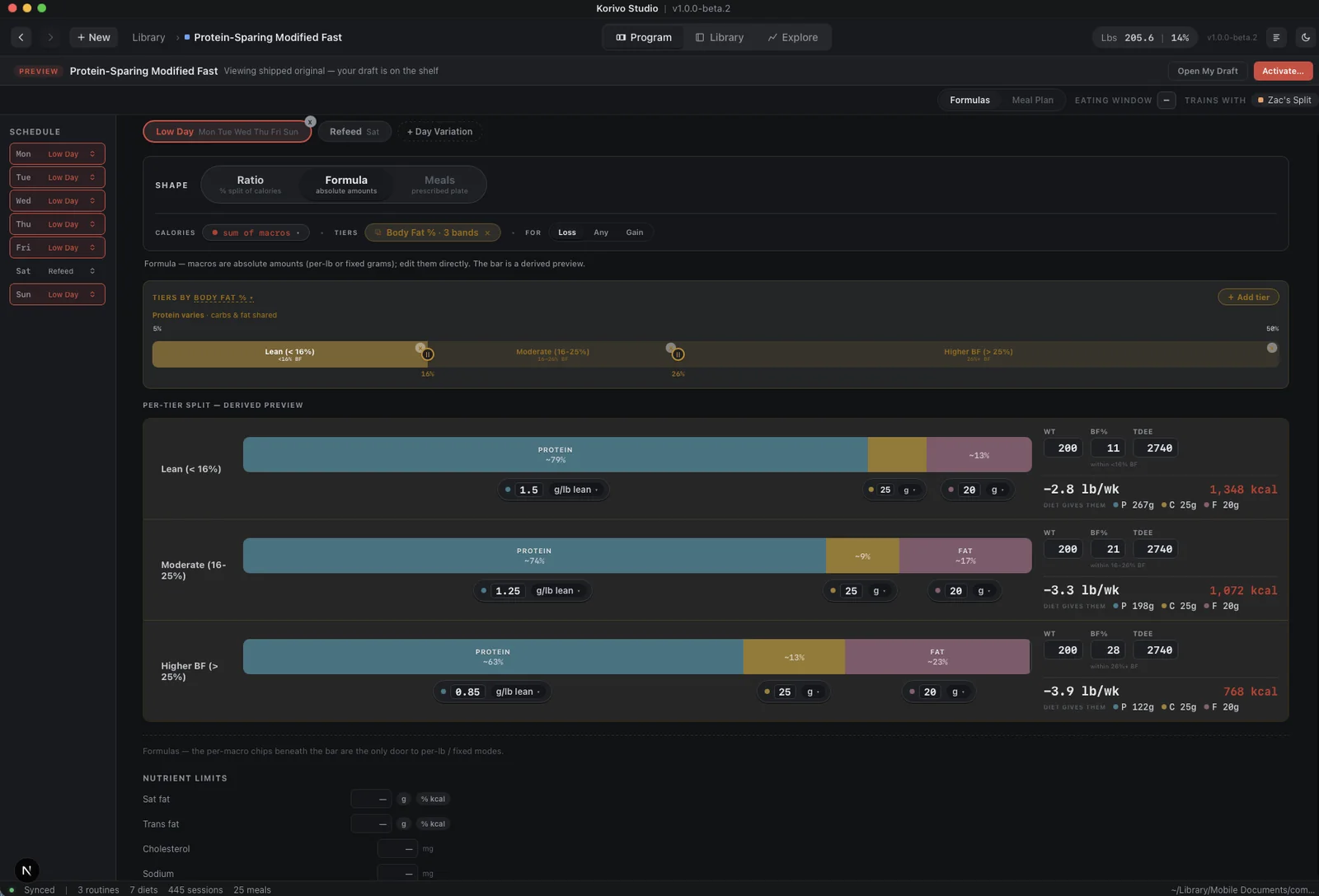
Korivo supports different targets by day of the week, refeeds, phased targets, meal plans, and formulas that respond to values such as weight or body-fat percentage. It can be difficult to tell whether a program actually does what you intended.
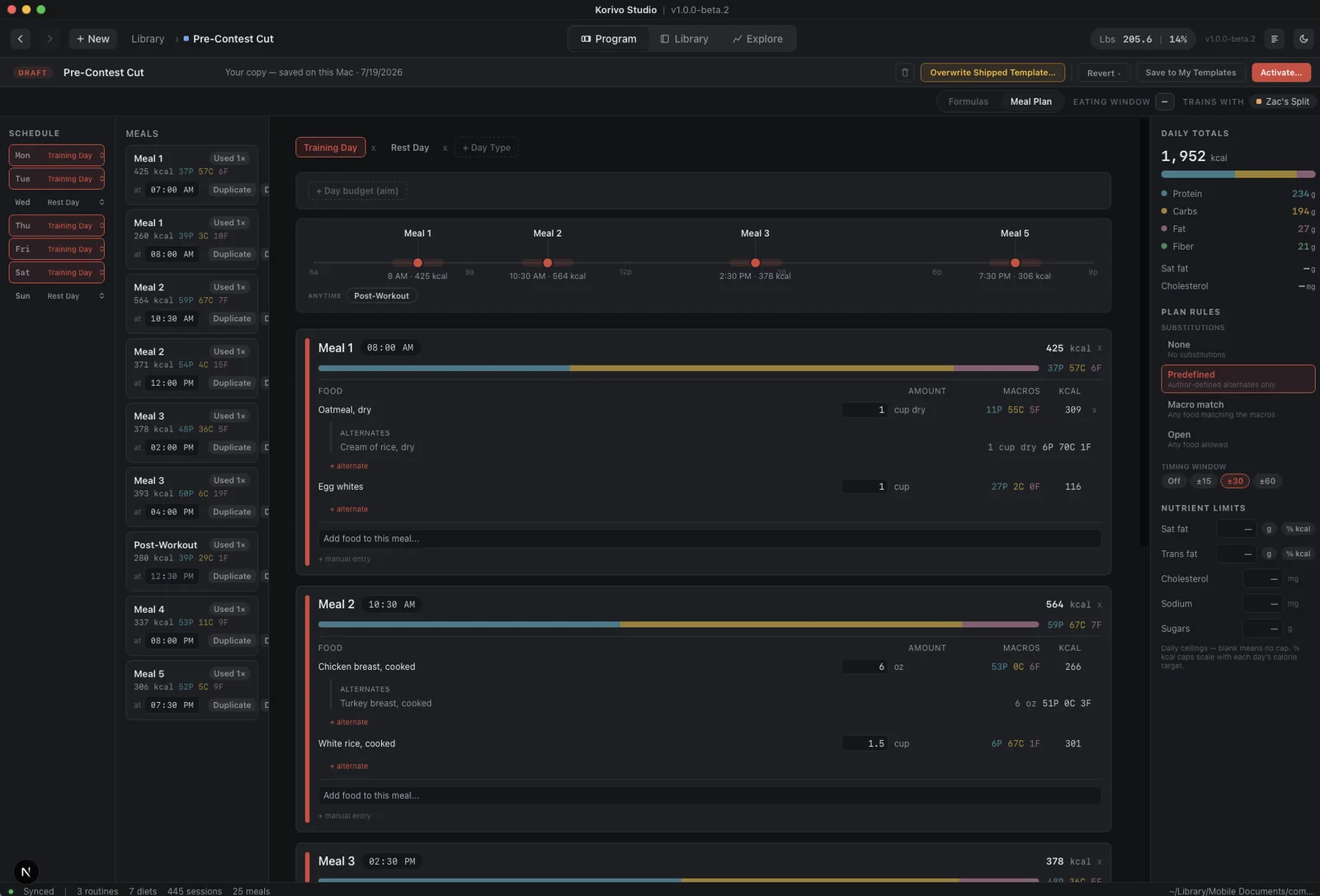
Studio shows the macro split as a bar because the relationship between protein, carbohydrates, and fat matters. When a formula changes across body-fat ranges, those ranges appear together with boundaries you can adjust. The resulting targets are shown underneath, so you can see the effect of a rule before it reaches a real program.
Meal plans also have structure beyond a list of foods. Studio places meals across the day so timing has a visible relationship. You can move a meal, inspect its foods, and provide alternatives without pretending every meal has to happen at an exact minute.
Formula constructor
Meal-plan timeline
05 / Density
Dense isn’t the same as cluttered
Korivo is built for people who already understand training and nutrition. Hiding everything behind a sequence of screens can make an interface look calm while making real work painfully slow. Studio is intentionally denser than the phone app.
It uses a few consistent devices:
- Direct manipulation for relationships and ordinary controls for exact values.
- Strong spatial grouping instead of unnecessary containers.
- Color to preserve identity across a program.
- Muted secondary information that remains available without competing with the current task.
- Persistent context so editing one part of a program doesn’t make the rest disappear.
Dense, but ordered
Direct manipulation still has to be inspectable. A progression point shows its percentage. A phase shows its duration. A meal shows its time. The user shouldn’t have to guess what a gesture changed.
06 / Explore
Korivo Explore helps you understand your real data
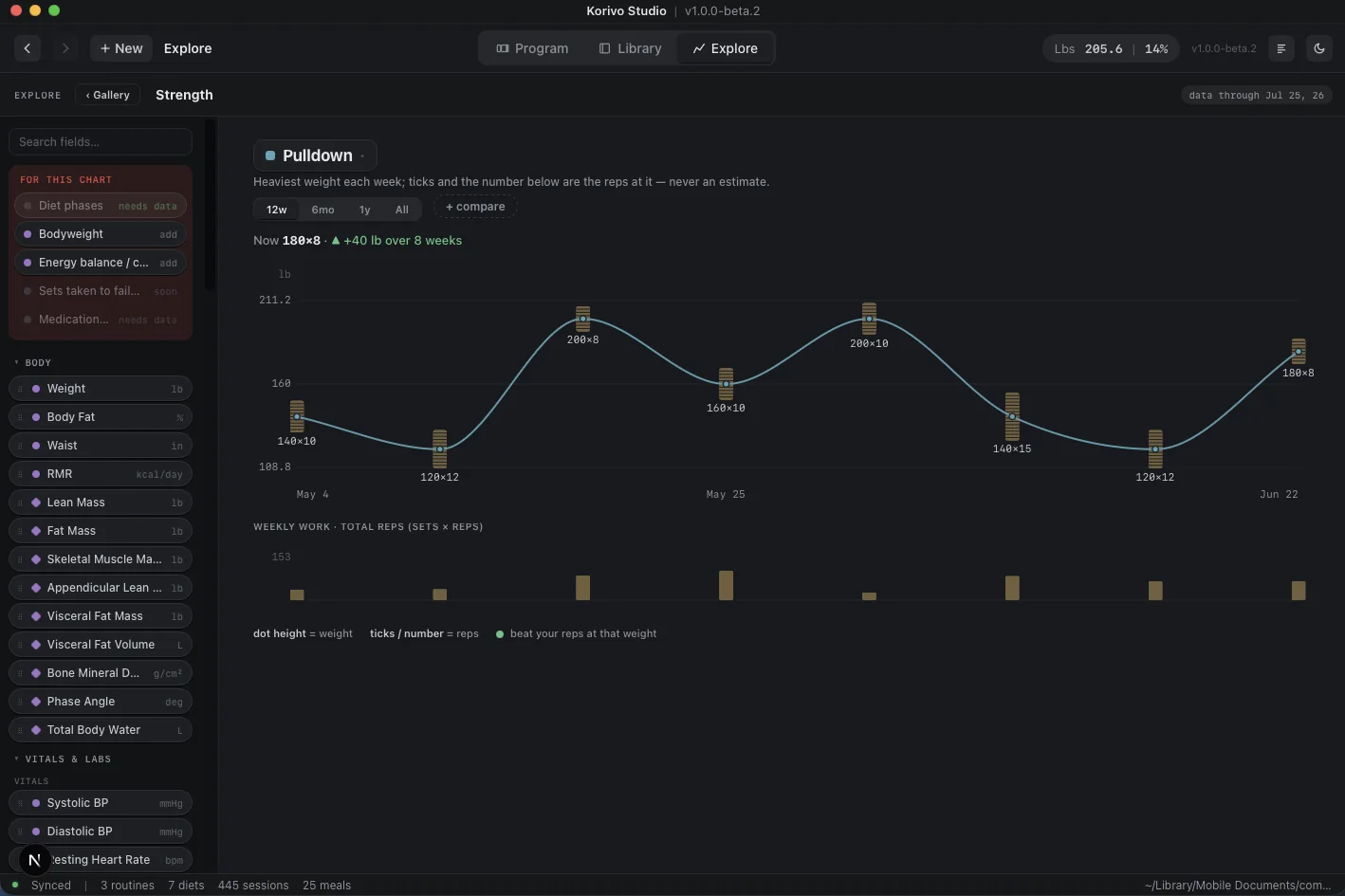
Fitness charts often replace recorded data with a derived score because a single smooth line is easier to present. Estimated one-rep max is a common example. It can be useful, but it can also hide the actual weight and repetitions that produced it.
Korivo’s Explore view starts with the data you’ve entered and approaches it from a lifter’s perspective. When we plot your lifts, we show both the weight and the number of reps you hit on one graph. You can add biometrics and nutrition history to look for relationships between them. We want users to explore and understand how the things they’re doing relate to one another.
Explore
07 / Judgment
The design should respect competence
Many fitness apps are jumping on the AI bandwagon. That’s great for someone who wants or needs to be told what to do. Korivo takes the opposite position. Korivo is built for lifters. If you’re building a detailed training and nutrition program, your judgment is the whole point. The software should help you express that judgment, show you how it will play out, and help you translate that to the gym floor.
The user stays in the loop
Korivo won’t be the first app someone opens when they decide they might start working out. That’s intentional. The product assumes that its users can understand a program, make decisions, and accept the consequences of those decisions. Respecting that competence changes the interface. We don’t need to turn every action into a lesson, every week into a streak, or every result into a congratulatory animation.
We do need to make complicated structures understandable. Writing a simple program should be quick and easy while still allowing users to create truly complex programs.
Korivo Studio
Built for the work
The desktop is where a serious program gets room to become a system.